Years of fish are sitting in your camera roll. Now they can go in your logbook: pick the photos, and Ghillie sorts them into trips and fish by the date each one was taken.
Import catch photos
New
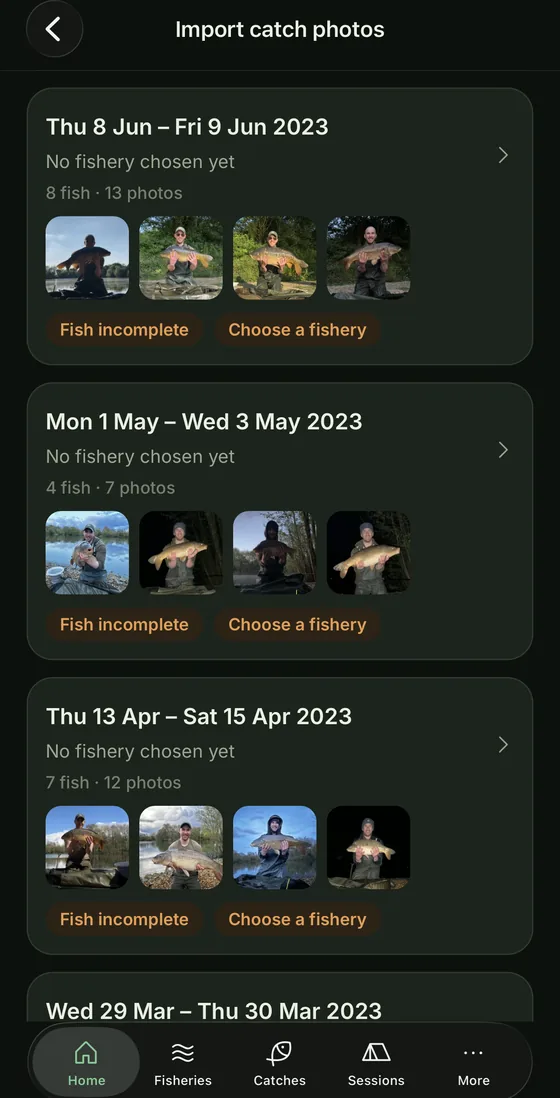
Import catch photos. In the More menu. Pick as many photos as you like and Ghillie sorts them for you: shots taken minutes apart become one fish, and fish on the same or following days become one trip.
Tidy up the grouping. Put photos of the same fish together, split them apart, move fish into another trip, or remove anything that isn't a catch.
Fill in one fish at a time. Choose the best photo, then add the species, weight, name, bait, rig and notes, and move on to the next fish. A weight in notes you paste in, like 24-06 or 24lb 6oz, is spotted for you.
Each trip becomes a session. Choose the fishery, or type a new one, and every fish becomes a catch with its photos. Nothing is added until every fish is ticked.
Undated photos. Photos that lost their date, often ones sent over WhatsApp, wait in their own pile. Group them into fish and trips there.
Start with your photos. New to Ghillie? Importing your catch photos is now the first choice when you open the app.
Personal bests. Log a fish that beats your best and Ghillie tells you what it beat. Your PB, your PB for each species and your best from each water are tagged on the catch, in your catch list and in the album.
Catch card. Share a single fish as a picture: the photo, weight, species, the water and the day, with a PB tag if it holds one. It never shows your swim, spot, bait or rig.
Better
A fish with no weight now shows "—" instead of 0lb 0oz, and is left out of averages.
The spots on a swim now show how many trips they've had and how many fish, blanks included.
Tap the water on a session to go straight to it.
User guide: a new topic on importing your catch photos.
Fixed
The More menu and the session sheets now sit cleanly at the top of the screen on iPhone.
On Android, a Premium unlock or promo code redeemed while Ghillie is open now shows as soon as you return to the app.
The biggest update since Ghillie 3 launched. On a live session, Ghillie now knows which rod is on which spot, and it can tell you what each one did when you pack up.
Active Rods
Rod details
Session summary
New
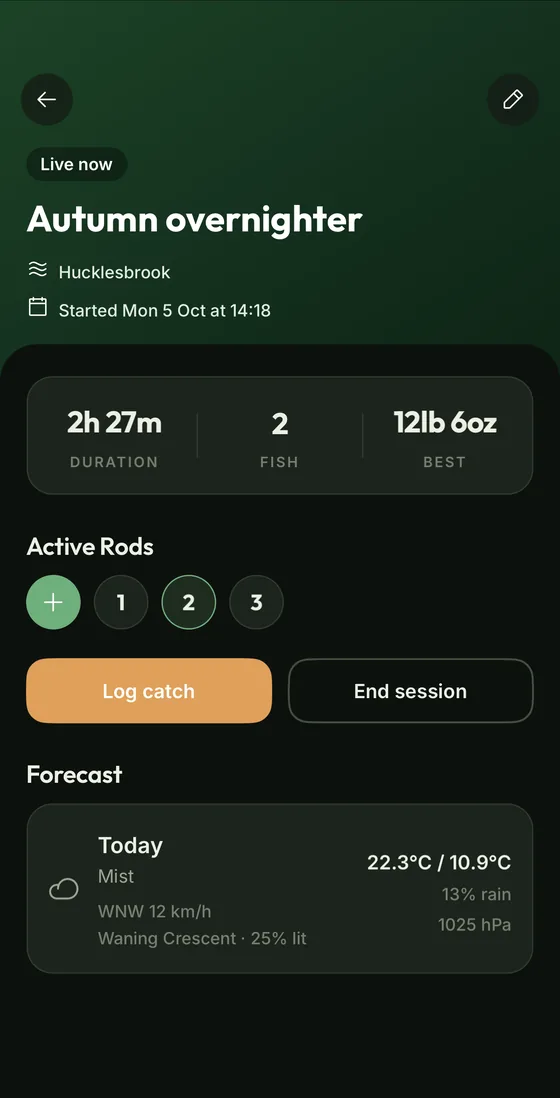
Active Rods. On a live session, pin each rod to its swim and spot, with the rig and bait that's on it.
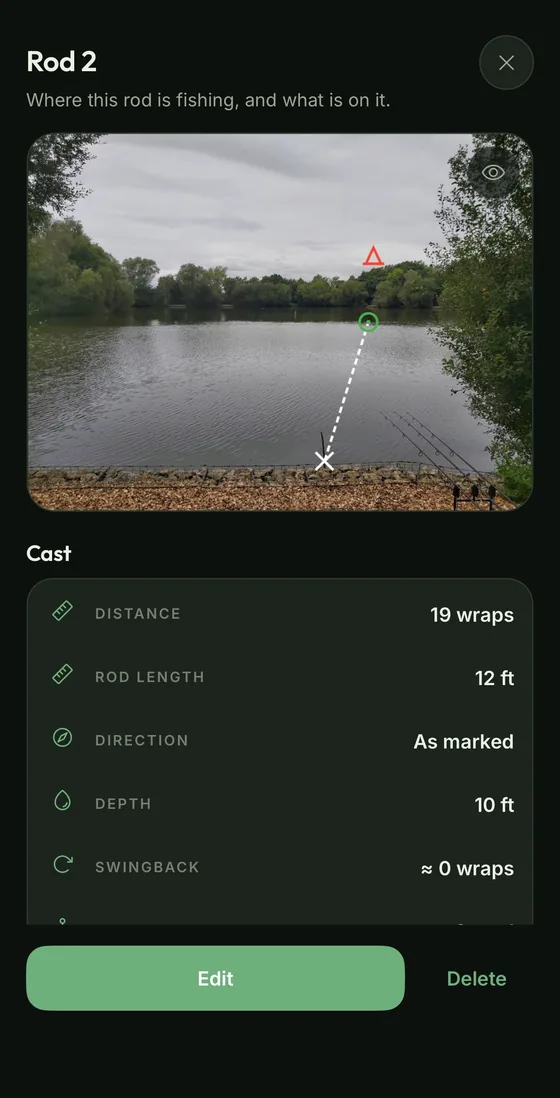
Everything you need to recast. Tap a rod for your marked spot photo, the distance, clip, depth and bait.
A rod length for each rod. Casting in wraps? Each rod starts from the spot's rod length and can be changed.
Log catch knows your rods. Pick the rod that went and the swim, spot and setup fill in.
Track record. Every swim and spot now shows trips, catches and blanks. Blanks count from this update onwards. Ghillie can't know the ones before.
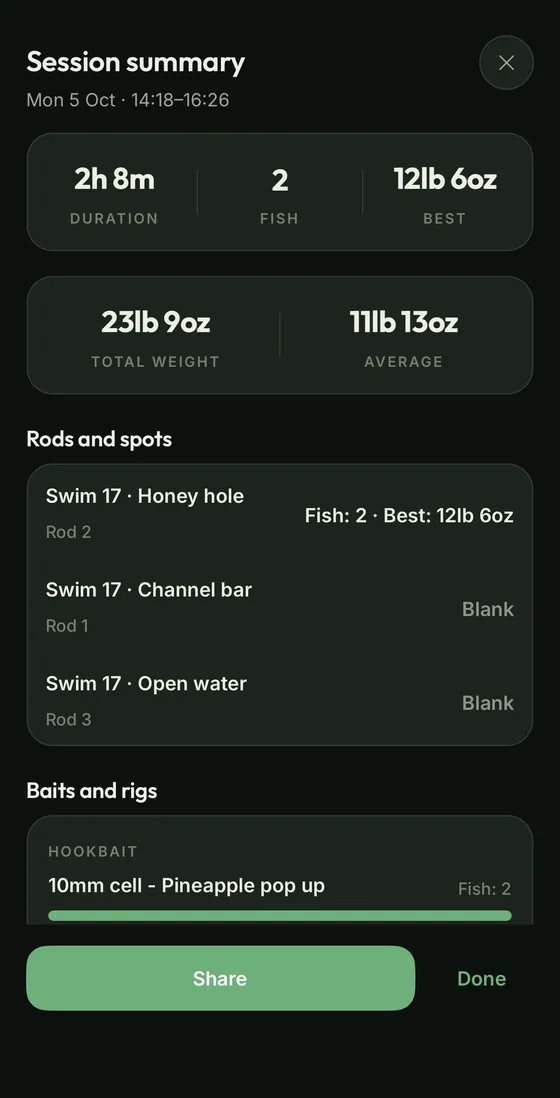
Session summary. Pack up and the session is on one screen: what each rod's spot did, which baits and rigs caught, bite times and conditions.
A summary card to share. Tap Summary card and Ghillie generates a card with your best fish of the session and your catches, ready to send to your friends.
Bite times by season. A grid of when your fish have come, spring to winter and morning to night, on Insights and on every water, swim and spot.
Bite times before you cast. Before and during a session, see when that water's fish have come at this time of year.
Better
Tidier pages: swim notes and fishery photos fold away, and long spot lists start at three.
User guide: new topics for Active Rods, the session summary and how to check Ghillie's privacy claims.
The tips on each screen now cover Active Rods and the session summary.
Fixed
Buttons on the session sheets no longer sit behind the tab bar on iPhone.
User guide. How everything works, in the More menu.
Notes. Keep dated notes on every water, swim and spot, with the important ones pinned to the top.
Favourite swims and spots. Star them and they join your waters on Home.
Rod length per spot, so wraps and swingback match the rod you cast it with.
Depth in feet or metres. A new unit setting.
Pinch to zoom on marked spot photos.
Better
Spot marking redesigned: clearer tools, a marker size slider and one-tap colours.
New installs get units for your region, with casts in wraps.
The catch album uses a trophy, not a star, and catch rows are tidier.
Catch pages show the place and each weather reading on its own row.
Long water descriptions and rules fold away.
Fixed
Spod swingback now tells you to clip the spod shorter, so it lands on your rig.
Opening More while editing no longer loses your changes.
The empty gap at the top of Home and list screens on iPhone.
3.0.2 and 3.0.3September 2026
Saved links, and Ghillie 3 on iPhone
New
Ghillie 3 on iPhone. The same app as on Android, with the same free trial and one-off unlock.
Saved links. Keep rig videos, knot tutorials and articles in folders, in the More menu.
Fixed
A camera error when taking a photo on Android.
3.0.025 September 2026
Ghillie 3: rebuilt from scratch
A native rewrite of the whole app. Faster, and it works with no signal.
Your Ghillie 2 records, photos and swims move across automatically the first time you open it.
No account or sign-in. Everything stays on your phone.
Works fully offline on the bank.
New: spot marking on your own swim photos, sessions, weather warnings, Insights and a map of your waters.
A 30-day free trial of everything, then a one-off unlock. No subscription.
Paid for Ghillie before? The unlock is yours free.
Not seeing the latest version?
Updates come through Google Play and the App Store, and can reach the two a few days apart. Open Ghillie's store page and tap Update. Found a bug or got an idea for the next one? Tell the maker.
 Ghillie